
Now Reading: Tutorial Gambar AI, Seri Kedua: Eksplorasi Gaya Desain Digital dan Seni Modern
-
01
Tutorial Gambar AI, Seri Kedua: Eksplorasi Gaya Desain Digital dan Seni Modern


Tutorial Gambar AI, Seri Kedua: Eksplorasi Gaya Desain Digital dan Seni Modern
Selamat datang kembali di bagian kedua dari seri tutorial kita! Jika seri pertama berfokus pada gaya yang meniru realisme dan seni klasik, kali ini kita akan beralih ke dunia desain digital dan seni modern.
Gaya-gaya ini sering kali berani, eksperimental, dan berfokus pada bentuk, warna, serta konsep yang unik. Mari kita eksplorasi 11 gaya berikutnya yang akan memperkaya portofolio kreatif Anda.
Yuk, jadi Seniman AI yang bisa bikin gambar keren apa pun. Cukup pelajari 30 gaya gambar yang ada di seri ini. Semuanya dilengkapi contoh prompt yang dapat Anda gunakan dengan ‘copy-paste’. Baca Juga:
- Tutorial Gambar AI (Seri Pertama): Fondasi Seni AI – Gaya Realistis dan Klasik. Mulai perjalanan kreatif Anda dengan menguasai 7 gaya fundamental, dari realisme yang mendetail hingga sketsa pensil.
- Tutorial Gambar AI (Seri Ketiga): Ciptakan Dunia dan Cerita. Sempurnakan keahlian Anda dengan 11 gaya terakhir, pelajari cara membangun suasana dan narasi lewat visual cyberpunk dan fantasi.
8. Gaya Flat Design
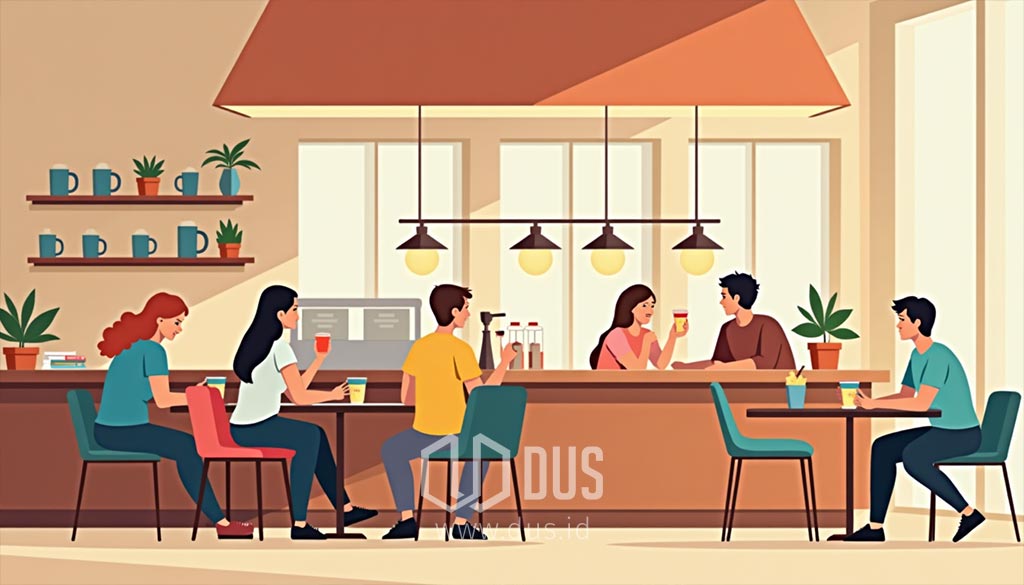
Gaya desain ini menggunakan objek dua dimensi dengan warna-warna solid, tanpa bayangan atau gradasi. Tujuannya adalah menciptakan visual yang sederhana, bersih, dan modern.
- Prompt (EN): Illustrate a flat design of a cozy coffee shop with warm colors, simple furniture, and customers enjoying their drinks.
- Prompt (ID): Ilustrasikan desain datar (flat design) dari kedai kopi yang nyaman dengan warna-warna hangat, perabotan sederhana, dan pelanggan yang menikmati minuman mereka.
9. Gaya Pixel Art

Gaya ini menggunakan piksel (kotak-kotak kecil) sebagai blok bangunan utama, menciptakan gambar dengan resolusi rendah yang memiliki nuansa retro dari video game klasik.
- Prompt (EN): Create a pixel art image of a lively market square in a small town, complete with colorful stalls and animated characters.
- Prompt (ID): Buat gambar seni piksel (pixel art) dari alun-alun pasar yang ramai di sebuah kota kecil, lengkap dengan kios-kios berwarna-warni dan karakter yang hidup.
10. Gaya Isometrik

Gaya ini menggambar objek tiga dimensi dari sudut pandang 45 derajat, menciptakan kesan kedalaman tanpa distorsi perspektif. Hasilnya adalah visual yang geometris, teratur, dan sering kali detail.
- Prompt (EN): Draw an isometric cityscape with small shops, vehicles, and trees, all in vibrant and clean geometric designs.
- Prompt (ID): Gambarlah pemandangan kota isometrik dengan toko-toko kecil, kendaraan, dan pepohonan, semuanya dalam desain geometris yang cerah dan bersih.
11. Gaya Low Poly

Mirip dengan gaya isometrik, low poly menggunakan poligon dengan jumlah minimal untuk menciptakan objek tiga dimensi yang terlihat sederhana, bersudut tajam, dan memiliki kesan visual yang modern.
- Prompt (EN): Create a low-poly image of a majestic mountain range at sunrise, with sharp geometric shapes and pastel colors.
- Prompt (ID): Buatlah gambar low poly dari pegunungan yang megah saat matahari terbit, dengan bentuk-bentuk geometris yang tajam dan warna-warna pastel.
12. Gaya Abstrak

Gaya ini melepaskan diri dari representasi visual yang realistis. Ia menggunakan bentuk, garis, dan warna untuk menciptakan komposisi yang fokus pada ekspresi dan emosi, bukan subjek yang dapat dikenali.
- Prompt (EN): Design an abstract piece with swirling colors in shades of blue and gold, representing the flow of water and sunlight.
- Prompt (ID): Rancang sebuah karya abstrak dengan warna-warna berputar dalam nuansa biru dan emas, mewakili aliran air dan sinar matahari.
13. Gaya Kubisme

Gaya ini memecah objek menjadi bentuk-bentuk geometris yang tumpang tindih dan merepresentasikannya dari berbagai sudut pandang secara bersamaan, menciptakan tampilan yang terfragmentasi.
- Prompt (EN): Create a cubist-style portrait of a woman playing a guitar, with overlapping geometric shapes and contrasting colors.
- Prompt (ID): Buat potret bergaya kubisme dari seorang wanita yang sedang bermain gitar, dengan bentuk-bentuk geometris yang tumpang tindih dan warna-warna yang kontras.
14. Gaya Pop Art

Terinspirasi dari seni populer dan komersial tahun 1950-an. Gaya ini ditandai dengan warna-warna cerah, garis tepi yang tebal, dan sering kali mengulang objek sehari-hari.
- Prompt (EN): Design a pop-art-inspired image of a can of soda, with bold outlines and vibrant colors in a Warhol-esque style.
- Prompt (ID): Rancang sebuah gambar terinspirasi seni pop (pop art) dari sebuah kaleng soda, dengan garis tepi yang tebal dan warna-warna cerah dalam gaya Warhol.
15. Gaya Art Deco

Gaya ini menekankan pada garis-garis yang bersih, bentuk-bentuk geometris, dan simetri. Sering kali menggunakan elemen mewah seperti aksen emas untuk menciptakan kesan elegan dan glamor dari tahun 1920-an dan 1930-an.
- Prompt (EN): Illustrate an Art Deco-inspired poster of a luxurious cruise ship, with golden accents and symmetrical patterns.
- Prompt (ID): Ilustrasikan sebuah poster terinspirasi Art Deco dari kapal pesiar mewah, dengan aksen emas dan pola-pola simetris.
16. Gaya Psychedelic

Gaya ini dicirikan oleh pola-pola yang berputar, warna-warna yang sangat cerah dan kontras, serta bentuk-bentuk organik yang melengkung. Tujuannya adalah meniru sensasi visual halusinasi.
- Prompt (EN): Design a psychedelic image with swirling, multicolored patterns surrounding a meditating figure.
- Prompt (ID): Rancang sebuah gambar psikedelik dengan pola-pola berputar dan aneka warna yang mengelilingi sosok yang sedang bermeditasi.
17. Gaya Doodle Art

Gaya ini menampilkan gambar-gambar yang unik dan lucu, seolah-olah dibuat dengan coretan tangan yang bebas. Sering kali bersifat monokrom, penuh detail, dan memiliki karakter yang menyenangkan.
- Prompt (EN): Design a doodle art scene with quirky characters, whimsical objects, and playful patterns in black and white.
- Prompt (ID): Rancang adegan seni doodle dengan karakter yang unik, objek-objek aneh, dan pola-pola yang menyenangkan dalam warna hitam dan putih.
18. Gaya Line Art

Gaya ini berfokus pada penggunaan garis yang bersih dan terus-menerus untuk membentuk objek tanpa bayangan atau warna. Sering kali digunakan untuk menciptakan visual yang minimalis dan elegan.
- Prompt (EN): Draw a detailed line art of a majestic eagle in flight, focusing on clean, continuous lines and intricate patterns.
- Prompt (ID): Gambarlah seni garis (line art) mendetail dari elang yang sedang terbang, berfokus pada garis-garis bersih dan terus-menerus serta pola yang rumit.
19. Gaya Minimalis

Gaya ini menggunakan elemen sesedikit mungkin—garis bersih, ruang kosong yang luas, dan palet warna terbatas—untuk menciptakan gambar yang sederhana, kuat, dan elegan.
- Prompt (EN): Create a minimalist image of a lone tree on a hill under a pale blue sky, using clean lines and muted colors.
- Prompt (ID): Buat gambar minimalis dari sebatang pohon sendirian di atas bukit di bawah langit biru pucat, menggunakan garis-garis bersih dan warna-warna yang diredam.
Membuat gambar AI dengan gaya desain dan modern adalah tentang bereksperimen dengan bentuk dan warna. Anda dapat menciptakan visual yang unik, menarik, dan penuh karakter. Pemahaman terhadap gaya-gaya ini akan membuka peluang baru untuk proyek-proyek grafis, ilustrasi, dan desain kreatif. Di bagian terakhir seri ini, kita akan menyelami dunia fantasi, narasi, dan suasana.
Mencoba Prompt Anda di Gemini dan Copilot
Setelah Anda memahami berbagai gaya, kini saatnya bereksperimen. Anda bisa menggunakan prompt di atas dan mengaplikasikannya di Gemini atau Copilot. Berikut panduan langkah demi langkah yang sederhana.
Langkah 1: Siapkan Prompt
Pilih salah satu prompt dari daftar di atas yang paling Anda sukai. Anda bisa menggunakan versi Bahasa Inggris atau Bahasa Indonesia.
- Tips: Untuk hasil terbaik, tambahkan detail lain yang Anda inginkan. Misalnya, jika prompt aslinya adalah “sebuah gambar hiper-realistis dari pantai yang tenang”, Anda bisa mengubahnya menjadi: “sebuah gambar hiper-realistis dari pantai di Bali saat matahari terbenam, dengan seekor anjing kecil bermain di pasir.”
Langkah 2: Gunakan Gemini
- Buka Gemini di situsnya: gemini.google.com.
- Di kolom percakapan, ketik perintah untuk membuat gambar, seperti: “buatkan gambar”, “ilustrasikan”, atau “gambarkan”.
- Setelah itu, tempelkan (paste) prompt yang sudah Anda siapkan.
- Contoh: gambarkan sebuah gambar hiper-realistis dari pantai di Bali saat matahari terbenam, dengan seekor anjing kecil bermain di pasir.
- Gemini akan memproses perintah Anda dan menghasilkan gambar dalam beberapa detik.
Langkah 2: Gunakan Copilot
- Buka Copilot di situsnya: copilot.microsoft.com.
- Pastikan Anda berada dalam mode “Kreatif” atau “Kreatif” untuk hasil gambar yang optimal.
- Di kolom percakapan, tuliskan perintah untuk membuat gambar, lalu tempelkan prompt Anda.
- Contoh: gambarkan sebuah gambar hiper-realistis dari pantai di Bali saat matahari terbenam, dengan seekor anjing kecil bermain di pasir.
- Copilot akan menghasilkan beberapa variasi gambar dari prompt Anda.
Tips Tambahan untuk Eksperimen
- Tambahkan Aktor: Coba tambahkan karakter atau objek (misalnya: “seorang ksatria”, “robot”, “sebuah apel”) ke dalam prompt Anda.
- Ubah Suasana: Mainkan dengan kata-kata yang mendeskripsikan suasana atau pencahayaan (misalnya: “pencahayaan dramatis”, “cahaya lembut”, “suasana tenang”, “remang-remang”).
- Ganti Gaya: Setelah Anda mendapatkan satu gambar, coba ganti gaya yang berbeda. Misalnya, jika Anda membuat gambar dengan gaya “Realistis”, coba buat ulang dengan gaya “Kartun” atau “Pixel Art” hanya dengan mengubah kata kunci gayanya di awal prompt.
✎ Artikel ini pertama kali terbit pada 22 Agustus 2025 dan diperbarui pada 19 November 2026.
♥ Suka ulasan DUS? Dukunganmu bantu kami terus menyajikan tulisan yang dalam, utuh, dan saksama.
✦ Teruskan penjelajahan...
- ①Internet Modern Dijelaskan dengan Mudah: Dari Kamu ke Data Center dan Sebaliknya.
- ②Bagaimana Otak Berubah Saat Berpikir Di‑Outsource ke AI.
- ③Studi MIT dan Stanford Ungkap Bahaya Chatbot AI: Terlalu Setuju yang Merusak Pikiran.
- ④Saat AI Menjadi Tempat Curhat: Mencari Teman Bicara di Era Digital.
- ⑤Five-Layer Cake: Cara Sederhana Memahami Kompleksitas AI.
Terus terinspirasi...
Dapatkan notifikasi langsung di ponsel begitu ada terbitan tulisan baru di dus.id.
Gabung ke DUS WhatsApp Channel ↗